

I needed a way to combine two of my favourite hobbies: programming and Disney. I think this project was definitely the way to go!
What is the Wait Times Planner?
Before I delve into how everything works, I thought it would be worth taking a second to explain what the wait times planner actually does. It might be worth opening the wait times planner alongside this blog post, so you can interact with it as I talk about it. You can access it by clicking this link. The main function is the ‘Ride Planner’. It allows a user to select one of the four main Walt Disney World Parks (Magic Kingdom, EPCOT, Hollywood Studios, Animal Kingdom) and then select 5 rides from that park. The planner then calculates the best time to ride these rides with the lowest wait times. The planner also offers another function to see general wait time statistics of one ride.
Wait Time Database
All of this data has got to come from somewhere. I have my own database that collects the live wait times at regular intervals. This sends a query to the Queue-Times.com API, which then returns the live wait times for a given attraction. This project would’ve been impossible if it wasn’t for the Queue-Times.com API! This is then added to my database in the appropriate time slot (Orlando Time).
General Stats
As mentioned previously, one function of the Wait Times planner is to obtain general wait times information for a given attraction. The screen for this is shown below…
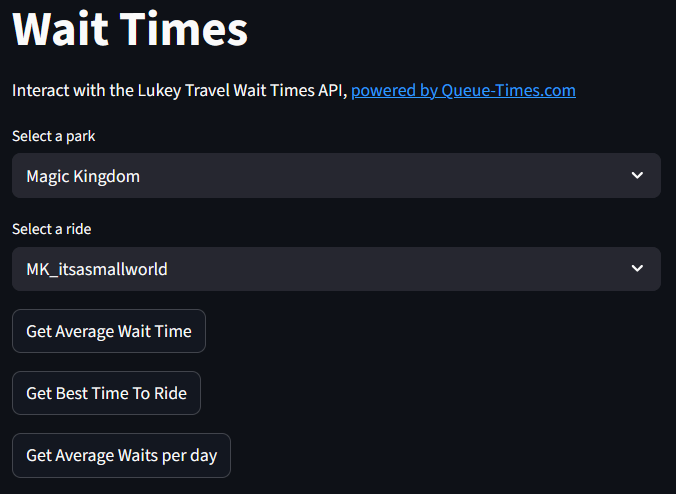
The interface for the program is created with Streamlit. If you’ve never heard of Streamlit, they’re worth checking out for a quick, easy to use interface for any of your programs. The code for the interface is up on my GitHub here if you want to check it out. The two dropdowns are used to select the park and ride respectively. Then, the user has the option of three different buttons. Let’s go through each in turn…
Get Average Wait Time
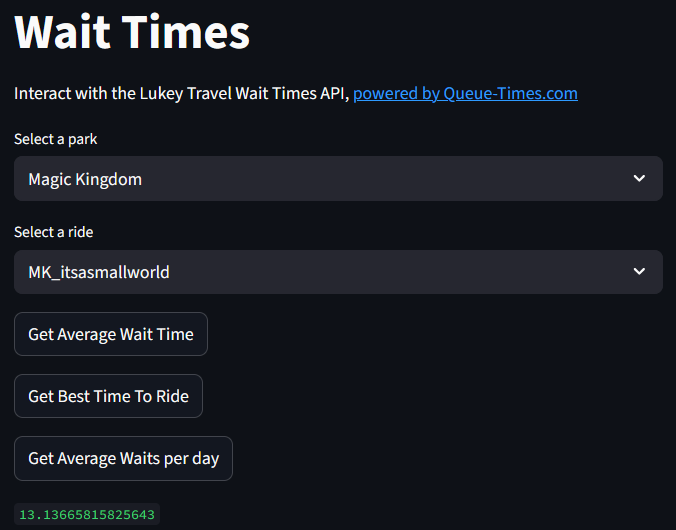
This button will send a call to the API to return the average wait time for the selected attraction. This is calculated live from the database, so will always be up-to-date when the user queries it. At the moment, it returns a long float (see image), but at some point I want to change this to be presented in a much nicer manner.
Get Best Time To Ride
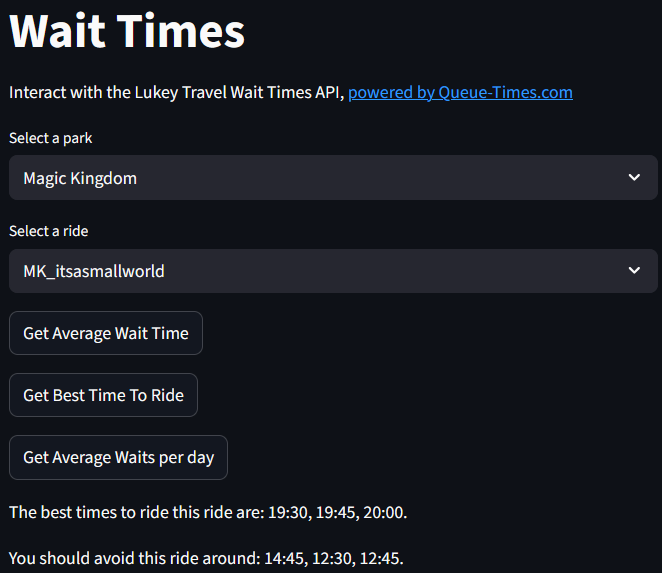
This button sends a call to the API to return the 3 best and 3 worst times to ride this ride. These are calculated by finding the average wait time for each time slot, and sorting them highest to lowest. The top 3 and bottom 3 values are then found. My main issue with this feature is that a lot of the time, the best times to ride occur at the start and the end of the day. I have resolved this to some extent by removing some early and late times from the calculations, but times still tend lean towards the end of the day. And yes, in most cases, the end of the day will be the best time to ride. I created the WTP to help navigate those busy times, so this is something I want to improve on in the future.
Get Average Waits Per Day
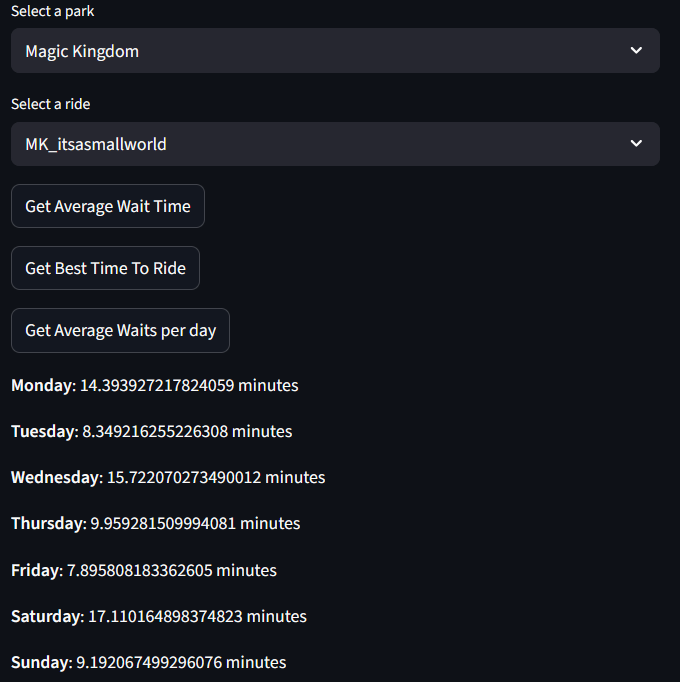
This function returns the average wait times per day of the week. This aims to show when the best days to visit certain parks to ride certain attractions are. This uses the Python datetime module to query what days dates in the database were, and then add the wait times them to a dictionary before calculating the average for each day. As before, I think I could do with trunkating some decimal places here!
Ride Planner
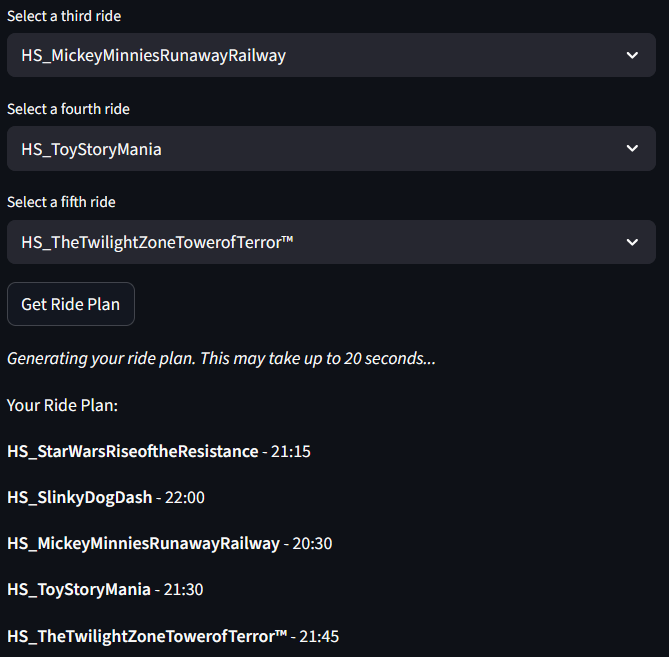
This is the reat “meat” of the tool. This allows users to input their top 5 rides for a certain park (in priority order), and the program will calculate the best times for them to ride said rides. The Ride Planner only uses data from the last 7 days. I opted for this rather than using the entire database for two reasons: one, using the whole database would have required a lot more processing especially as the database continues to grow and two, I wanted the data to be recent to reduce the likelihood of inaccuracies! It uses the same underlying function as the ‘Get Best Time to Ride’ button from the previous page. An example of the ride planner in action is shown below…
Current “Pain Points”
My main gripe with the planner currently is that the times are often heavily weighted toward the end of the day (see ‘Get Best Time to Ride’). So that would be one of my priorities to get ironed out. Another is the naming of the rides. As you can see from the images, the ride names used are not particularly user-friendly. This is something else that I want to get sorted soon, and shouldn’t be too difficult either. Better presentation of results is also something that needs attention.
Future Improvements
Aside from those mentioned above, I also would like to take into account the average wait times in the Ride Planner. For example, if a ride was suggested for 12:45, and had an average wait time for that slot of 70 minutes, another ride wouldn’t be suggested for another 70 minutes. I think this will make the planner significantly ‘smarter’!
Conclusion
Although I’m yet to try the tool myself (I live over 4,000 miles from Walt Disney World!), I think it is a very beneficial tool to any park-goer. With the improvements I hope to bring, I hope it’s only going to get better! Please share your thoughts and opinions in the comments, and give the planner a go and send any feedback to the destinations shown on the page! Thank you!
See ya real soon!
